

Most wiper malware is blunt. It gets on a machine, destroys what it can, and doesn’t pretend to be anything else. GigaWiper is different — and that difference is the whole story.
Microsoft’s Threat Intelligence team published a detailed technical breakdown of GigaWiper on July 9, 2026, describing a Go-based Windows backdoor that stitches together three separate destructive tools — a raw disk wiper, a fake ransomware module, and a secure multi-pass wiper — into a single modular implant. It also spies on victims, hides as OneDrive, and talks to its operators through infrastructure that looks like ordinary business traffic. Microsoft first observed the destructive activity in October 2025; independent researchers at Google’s Threat Intelligence Group (GTIG) and Binary Defense separately documented the same malware under the name BLUERABBIT, months before Microsoft’s disclosure.
What GigaWiper Actually Is
GigaWiper isn’t a single piece of malware written from scratch. According to Microsoft, it’s an amalgamation — the code and functionality of at least three known malware families combined into one backdoor, with new command-and-control capability built around them. That’s a meaningful distinction from most wiper coverage you’ll read: this isn’t “a new wiper was found.” It’s “an existing wiper, an existing fake-ransomware tool, and a new C2 framework got merged into one implant.”
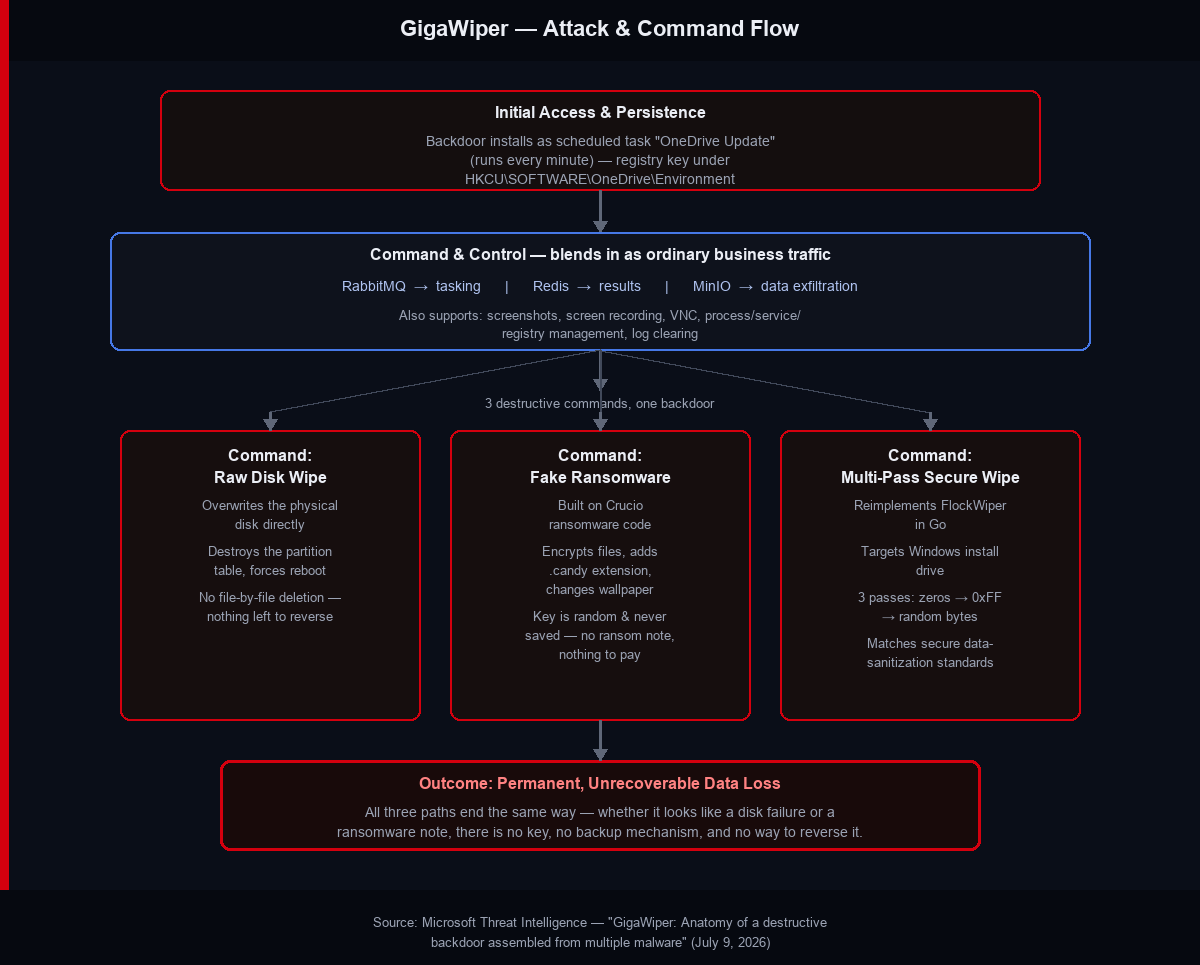
The backdoor supports a numbered command set that reportedly runs from 1 to 20, covering everything from process and service management to registry manipulation, log clearing, and starting a remote-control server — on top of the three destructive payloads that make it dangerous.
The Three Destructive Commands
This is the part worth understanding in detail, because each command does something distinct — and none of them behave the way ransomware normally does.
1. Raw disk wiper
One command overwrites the physical disk directly and removes the partition table before forcing a reboot. There’s no file-by-file deletion here, which matters because file-by-file deletion is at least theoretically recoverable with forensic tools. Overwriting the raw disk and destroying the partition metadata isn’t something you undo — it’s designed to leave nothing to reverse.
2. Fake ransomware, built on real ransomware code
The second destructive command is where GigaWiper gets its “fake ransomware” label, and it’s the most deceptive piece of the three. Microsoft traced this command’s code directly back to Crucio ransomware, a family documented in a CISA advisory back in December 2023. Microsoft states plainly: “GigaWiper backdoor command 3 is heavily based on Crucio’s code, leading to the assessment that the same threat actor developed both malware families.”
It encrypts files, appends a .candy extension, and changes the desktop wallpaper to an alarming warning image — the visual playbook of ransomware. But the encryption keys are randomly generated and never saved anywhere. There’s no ransom note. There’s nothing to pay, and there’s nothing to decrypt, even in principle, even if the victim wanted to pay. It looks like ransomware to a victim staring at the screen. It behaves like a wiper the moment you check whether recovery is possible.
3. Multi-pass secure wipe of the Windows drive
The third destructive command targets the Windows installation drive specifically, applying multiple overwrite passes with alternating patterns — zeroed data, then 0xFF, then random bytes. That’s the same general approach used by legitimate data-sanitization standards, just repurposed for destruction instead of secure decommissioning. Microsoft attributes this command to a Go reimplementation of FlockWiper, a C-based wiper that first surfaced on VirusTotal in June 2025 — several months before GigaWiper itself was observed in the wild.
Why Disguise a Wiper as Ransomware?
This isn’t a new idea, and Microsoft’s analysis draws the obvious historical parallel: NotPetya did exactly this in 2017. It presented itself as ransomware while quietly destroying data with no intention of ever providing a decryption key.
The tactic works because of how incident response triages an attack in its first hours. A machine that displays a ransom note and an encrypted file extension gets treated, at least initially, as a ransomware incident — something with a possible recovery path, whether through backups, a decryptor, or negotiation. A machine with its raw disk overwritten and its partition table destroyed gets treated as a total loss immediately. The disguise buys the attacker time by changing how the victim perceives the severity of what just happened, even though the actual outcome — permanent data loss — is identical either way.
“The consolidation of multiple destructive capabilities into a modular backdoor reflects a notable shift in wiper malware, which are typically designed purely to destroy rather than to extort… GigaWiper exemplifies threat actors investing in operational efficiency, merging standalone tools into unified platforms that reduce their deployment footprint while expanding their destructive capabilities.”
— Microsoft Security Blog
How It Hides and Communicates
GigaWiper’s persistence mechanism is straightforward but effective at blending in: it registers a scheduled task named “OneDrive Update” that runs every minute and at startup, and it tracks its own execution count in a registry key under HKCU\SOFTWARE\OneDrive\Environment. Nothing about that name or registry location would look out of place to someone scanning a task list quickly — which is the point.
The command-and-control setup is more interesting than a typical HTTP beacon. Instead of talking to a web server, GigaWiper rides on real business infrastructure: RabbitMQ for receiving tasking, Redis for sending results back, and MinIO for exfiltrating data. On networks that already run these services for legitimate purposes, that traffic doesn’t stand out the way a connection to an unfamiliar IP or domain would.
Beyond the destructive commands, GigaWiper also functions as a working spyware/backdoor tool — it can capture screenshots, record the screen, open a VNC session, pull system information, and manage installed programs and services.
Who’s Behind It — What’s Confirmed and What Isn’t
It’s worth being precise here, because attribution claims vary by source. Microsoft’s own writeup does not name a country or specific threat actor. What Microsoft does state is a code-level assessment: the fake-ransomware command shares code with Crucio, and the team’s analysis is that the same developer built both Crucio and the FlockWiper-derived wiping command.
The country attribution comes from elsewhere. Binary Defense, citing Google’s Threat Intelligence Group, ties this malware — tracked independently as BLUERABBIT — to a likely Iran-nexus group targeting organizations in Israel. That’s an assessment from a separate research team, not something Microsoft itself confirmed in its disclosure. If you’re covering this story, it’s worth keeping those two things distinct: the malware’s technical lineage (Crucio, FlockWiper) is Microsoft’s own finding; the geopolitical attribution is GTIG/Binary Defense’s.
Detection Signals to Watch For
Based on the behavior Microsoft documented, a few concrete things are worth checking in your environment:
- A scheduled task named “OneDrive Update” that fires every single minute — legitimate OneDrive update checks don’t run on that interval.
- A registry key at
HKCU\SOFTWARE\OneDrive\Environmentthat doesn’t match what your actual OneDrive installation would create. - RabbitMQ or Redis client traffic originating from ordinary desktop endpoints rather than application servers — that’s an unusual pattern worth investigating on its own, independent of GigaWiper specifically.
- Files appearing with a
.candyextension alongside a wallpaper change — by the time you see this, the disk-wiping commands may already have run or be queued to run, so this is a “respond immediately” signal, not a routine alert.
The Bottom Line
GigaWiper is a reminder that “is this ransomware or a wiper?” is increasingly the wrong first question to ask during an incident. The honest answer, based on what’s been documented so far, is that the distinction is being deliberately blurred by design. What matters operationally is recognizing the persistence and C2 patterns early — the OneDrive-disguised scheduled task, the unusual RabbitMQ/Redis traffic — before any of the three destructive commands get a chance to run, because once they do, there’s no ransom note to negotiate and no key to recover.

Leave a Reply