

You’ve probably noticed that some emails in your inbox now show a company logo right next to the sender’s name. That little logo is not a coincidence — it’s the result of a standard called BIMI, and it’s quietly reshaping how we decide whether an email is worth opening.
What Is BIMI?
BIMI stands for Brand Indicators for Message Identification. It’s a relatively new email authentication standard that lets organisations display their official brand logo in the email client — Gmail, Apple Mail, Yahoo, and others — before you even open the message.
Think of it like a verified badge, but for your inbox. When you see a logo next to an email from your bank, it tells you: this message genuinely came from that organisation, and the domain is properly secured.
Why Does It Matter?
Email phishing is one of the most common ways attackers get into systems. Spoofed emails — ones that look like they’re from your bank, your HR team, or a delivery service — are responsible for a huge chunk of breaches. BIMI helps fight this in a straightforward way: if you can see the real logo, you know it’s real.
From a brand perspective, it also boosts open rates. Studies have shown that emails with visible brand logos see higher engagement. So it’s a win for security and a win for marketing — which is a rare combination.
How Does BIMI Actually Work?
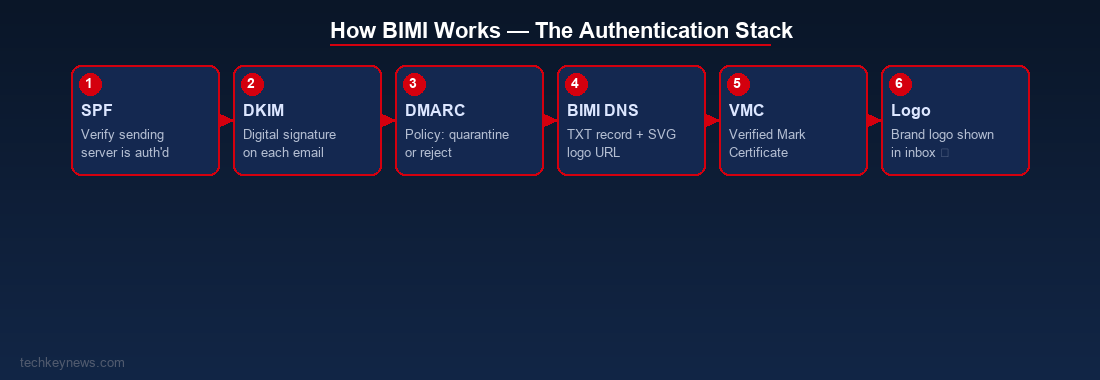
BIMI doesn’t work in isolation. It builds on top of three existing email authentication protocols:
- SPF (Sender Policy Framework) — Verifies the sending server is authorised to send email on behalf of your domain.
- DKIM (DomainKeys Identified Mail) — Adds a digital signature to every email, proving it hasn’t been tampered with in transit.
- DMARC (Domain-based Message Authentication, Reporting & Conformance) — Tells mail servers what to do with emails that fail SPF or DKIM checks. For BIMI to work, your DMARC policy must be set to
quarantineorreject.
Once those three are in place, you add a BIMI DNS record pointing to your logo (in SVG format) hosted at a public URL. For some mail providers — particularly Gmail — you also need a VMC (Verified Mark Certificate), which is issued by a trusted certificate authority like Entrust or DigiCert after verifying your trademark.
What Does a BIMI DNS Record Look Like?
default._bimi.yourdomain.com IN TXT "v=BIMI1; l=https://yourdomain.com/logo.svg; a=https://yourdomain.com/vmc.pem"The l= field points to your SVG logo. The a= field points to your VMC certificate. If you don’t have a VMC yet, you can still publish BIMI and it will work on some clients, but Gmail requires the VMC.
Which Email Clients Support BIMI?
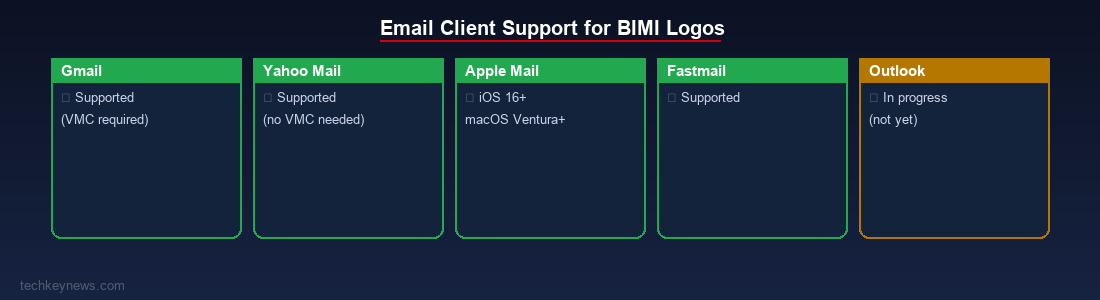
Support is growing fast. As of now, BIMI logos are displayed in:
- Gmail (desktop and mobile)
- Yahoo Mail
- Apple Mail (iOS 16+, macOS Ventura+)
- Fastmail
Outlook support has been slower, but Microsoft has indicated it’s on the roadmap.
Should You Implement BIMI?
If you run any kind of organisation that sends emails — newsletters, transactional emails, customer comms — yes, you should. Here’s why:
- It signals that your email infrastructure is properly secured
- It reduces the chance of your domain being spoofed
- It builds trust with your recipients before they’ve read a single word
- It’s increasingly expected in enterprise and financial sectors
The barrier to entry is low if you already have SPF, DKIM, and DMARC configured. The VMC costs money (roughly $1,000–$1,500/year) but for larger brands it’s well worth it.
Quick Checklist to Get Started
- ✅ Configure SPF for your domain
- ✅ Set up DKIM signing
- ✅ Publish a DMARC record with
p=quarantineorp=reject - ✅ Prepare your logo in SVG Tiny P/S format
- ✅ Optionally, obtain a VMC for Gmail support
- ✅ Publish your BIMI DNS TXT record
- ✅ Test with tools like BIMI Inspector or MXToolbox
Final Thought
BIMI is one of those rare security improvements that’s visible to regular users, not just security teams. In a world where phishing is rampant, making trust visible in the inbox is a genuinely good idea. If you’re managing email for any organisation, getting BIMI in place should be on your to-do list for this year.

Leave a Reply