

If you ask most security analysts what their most valuable data source is, they’ll say endpoint logs or firewall logs. DNS logs rarely make the top of the list. But they should. DNS is queried for almost every internet connection a machine makes — which means DNS logs are one of the most comprehensive and underused records of what’s happening on your network.
How DNS Works (Brief Recap)
When your computer wants to connect to example.com, it first asks a DNS resolver: “what’s the IP address for example.com?” The resolver queries a hierarchy of DNS servers and returns the answer. This happens before any actual connection is made — which means DNS logs capture intent before the connection, not just after.
In enterprise environments, DNS queries typically flow through an internal recursive resolver (like Windows DNS Server or a dedicated appliance), which makes it possible to log every query from every device on the network.
What Do DNS Logs Contain?
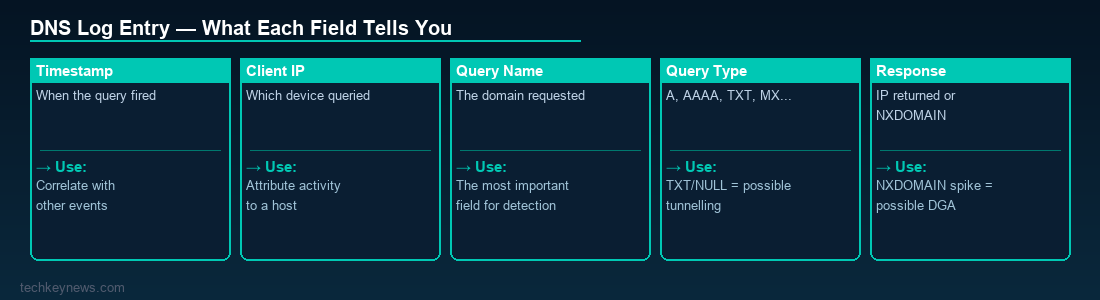
A typical DNS log entry includes:
- Timestamp — when the query was made
- Client IP — which device made the query
- Query name — the domain being resolved (e.g.
malware-c2.example.com) - Query type — A, AAAA, MX, TXT, CNAME, etc.
- Response — the IP address(es) returned, or NXDOMAIN if the domain doesn’t exist
- Response code — NOERROR, NXDOMAIN, SERVFAIL, etc.
Why DNS Logs Are Invaluable for Security
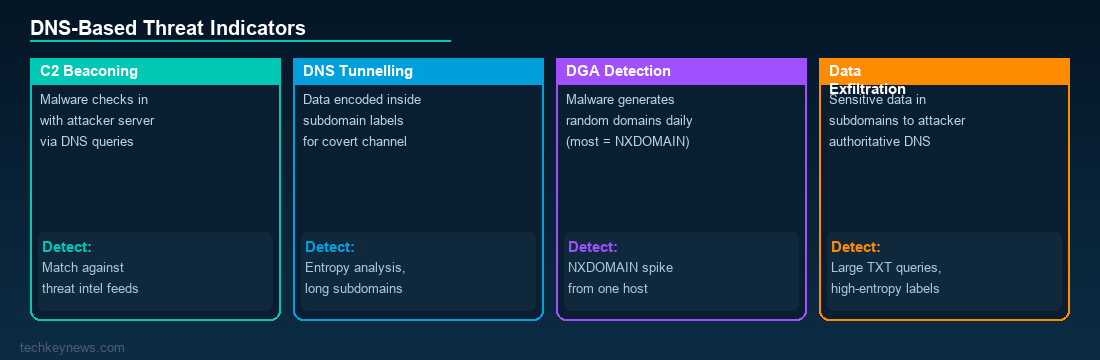
1. Detecting Command-and-Control (C2) Traffic
Most malware needs to communicate with a C2 server. That communication almost always starts with a DNS query. By monitoring DNS logs, you can spot:
- Queries to known malicious domains (match against threat intel feeds)
- Domains with high entropy names (random-looking strings are often algorithmically generated by malware)
- Newly registered domains (attackers often register domains shortly before using them)
- Unusual TLDs that legitimate business traffic rarely uses
2. DNS Tunnelling Detection
DNS tunnelling is a technique where data is encoded inside DNS queries and responses to exfiltrate data or establish covert communication channels. Signs in DNS logs include:
- Abnormally long subdomain labels (e.g.
aGVsbG8gd29ybGQ.attacker.com) - High volume of TXT or NULL record queries
- Unusually high query rate to a single domain
- Large DNS response sizes
3. Domain Generation Algorithm (DGA) Detection
Many malware families use DGAs to generate hundreds or thousands of potential C2 domain names daily. Most of these resolve to NXDOMAIN (the domain doesn’t exist), but the malware queries them hoping one has been registered. A spike in NXDOMAIN responses from a single host is a strong indicator of DGA malware activity.
4. Tracking Lateral Movement and Reconnaissance
During internal reconnaissance, attackers often query DNS for internal hostnames, mail servers, or domain controllers. Unusual internal DNS queries — especially from hosts that don’t normally make them — can be an early indicator of post-compromise activity.
5. Data Exfiltration
Even without full DNS tunnelling, attackers sometimes encode sensitive data into subdomains and send queries to attacker-controlled authoritative servers. The data never needs to reach an HTTP endpoint — it travels entirely within DNS.
Setting Up DNS Logging
Windows DNS Server
Windows DNS Server supports analytical logging via ETW (Event Tracing for Windows). Enable it with:
Set-DnsServerDiagnostics -All $trueOr enable the DNS Debug Log from the DNS Manager GUI. Note that debug logging can be verbose — consider forwarding to a SIEM rather than relying on local log files.
Sysmon (DNS Query Logging)
Sysmon Event ID 22 captures DNS queries made by processes on the endpoint. This is particularly useful for correlating which process made which DNS query.
Zeek / Network-Based DNS Logging
If you have a network monitoring solution like Zeek (formerly Bro), it generates dns.log with comprehensive records of every DNS transaction on the wire — useful for environments where you can’t deploy endpoint agents.
Quick Wins for DNS-Based Detection
- Feed your DNS logs into a SIEM and match against threat intelligence domain blocklists
- Alert on NXDOMAIN rates — more than 50 NXDOMAINs per host per hour deserves a look
- Flag queries to domains registered less than 30 days ago
- Watch for TXT queries from non-mail-related processes
- Build a baseline of normal DNS activity per host type — deviations stand out
Wrapping Up
DNS logs don’t replace endpoint or network logs — they complement them. But their coverage is uniquely broad: every internet-bound connection generates a DNS query, and that query is logged before any data is transferred. For threat hunters and incident responders, getting comfortable with DNS log analysis is one of the highest-value skills you can develop. If you’re not already collecting and monitoring DNS logs, start today.



Leave a Reply