

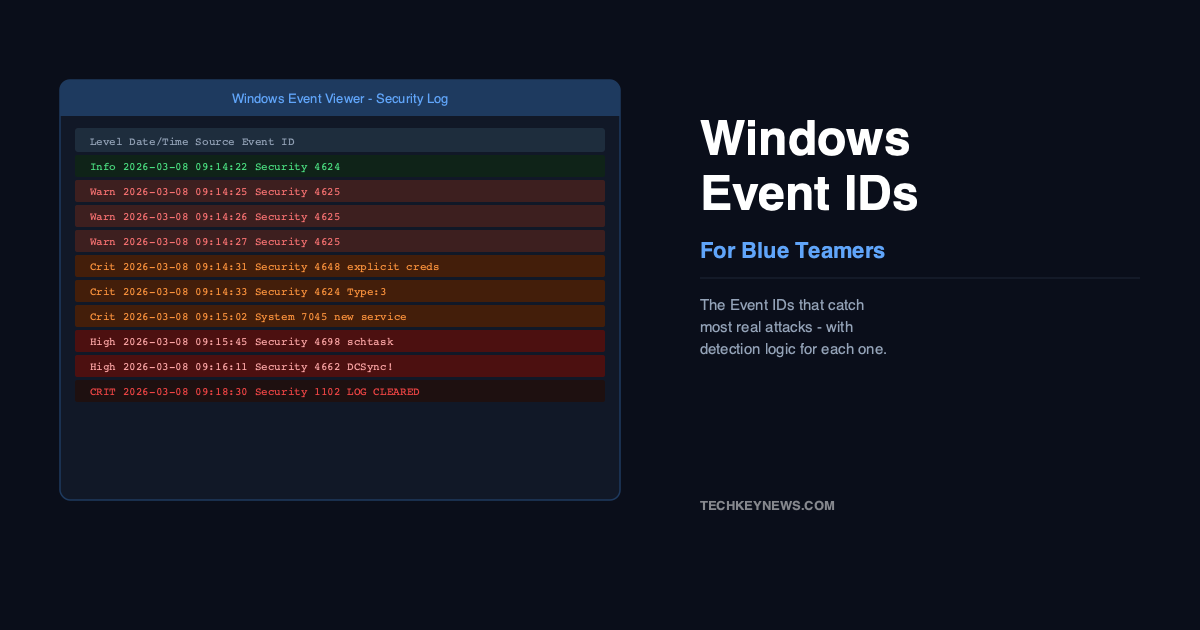
If you work in a SOC or you’re trying to understand what happened on a Windows machine after an incident, event logs are usually where the story lives. The problem is Windows generates an enormous amount of log data — and most of it is noise. Finding the signal requires knowing which Event IDs actually matter.
I’ve gone through enough incident reports and detection engineering write-ups to put together this reference. It’s not every Event ID — it’s the ones that come up again and again in real attacks. Learn these and you’ll catch a lot of what matters.
First: Enable the Right Audit Policies
Before any of this is useful, you need the right audit policies enabled. Windows doesn’t log everything by default. Without Advanced Audit Policy Configuration turned on via Group Policy, critical events like process creation (4688) and scheduled task creation (4698) simply don’t exist in your logs.
Also enable PowerShell Script Block Logging under Windows Components > Windows PowerShell. Without it, Event ID 4104 doesn’t fire, and you’re blind to encoded PowerShell — which is in virtually every modern attack chain.
Authentication Events
4624 — Successful Logon
The most fundamental logon event. On its own it’s not suspicious — users log in constantly. What makes it interesting is the LogonType field. Type 3 is a network logon. Type 10 is Remote Desktop. When you see a Type 3 logon from a workstation to another workstation, that’s worth investigating — workstations don’t normally authenticate to each other. That pattern often means lateral movement.
LogonType 2  = Interactive (local login)
LogonType 3  = Network (file share, SMB)
LogonType 10 = Remote Interactive (RDP)
LogonType 7  = Unlock (screen unlock)

Red flag: Type 3 from workstation to workstation
Red flag: Type 10 (RDP) to unexpected machines
4625 — Failed Logon
Failed logons. One or two is normal. Fifty in ten minutes from the same IP is a brute force. The SubStatus field tells you why it failed — 0xC000006A is a wrong password, 0xC0000072 is account disabled, 0xC0000234 is account locked out. A flood of 0xC000006A against a single account? That’s a brute force in progress. Many accounts from one source with low volume each? Password spraying.
4648 — Logon with Explicit Credentials
This fires when someone uses different credentials to log in — runas, PsExec, or tools like Mimikatz that pass credentials explicitly. It’s one of the best lateral movement indicators because it shows the account being used to authenticate is different from the account that initiated the process. If you see 4648 followed by 4624 on a remote machine using a Domain Admin account from a standard workstation, that’s your attack.
4672 — Special Privileges Assigned
Fires when a privileged account logs on. The interesting field is which privileges were assigned — SeDebugPrivilege lets a process read memory of other processes (Mimikatz uses this), SeBackupPrivilege lets you bypass file ACLs. If a non-admin account suddenly has these privileges, investigate immediately.
Process Execution
4688 — New Process Created
This is useless without command-line auditing enabled. With it enabled, you see the full command that was run. That’s where you catch encoded PowerShell, suspicious certutil downloads, and cmd.exe /c chains. Watch for processes spawned by unusual parents — powershell.exe spawned by excel.exe is a macro executing. cmd.exe spawned by svchost.exe is something abusing a service.
4104 — PowerShell Script Block Logging
Logs the actual content of PowerShell scripts as they execute. This is where you see the decoded version of base64-encoded commands. Attackers know this exists and sometimes try to evade it, but Script Block Logging catches the deobfuscated version — meaning it logs what PowerShell actually runs, not just the encoded string it was passed.
Persistence Mechanisms
4698 — Scheduled Task Created
Scheduled tasks are one of the most common persistence mechanisms used by attackers. They’re legitimate, they survive reboots, and most organisations don’t monitor them closely. Alert on scheduled task creation that executes from temp directories or AppData paths — legitimate software doesn’t typically schedule tasks from those locations. Also watch for tasks with PowerShell commands containing -enc or -EncodedCommand.
7045 — New Service Installed
A new service appearing on a server is worth examining. Check the binary path. If it’s pointing to something in a Windows temp folder, a user’s AppData folder, or a random exe you don’t recognise, that’s almost certainly malicious. Attackers use services because they run as SYSTEM and survive reboots. The combination of 4688 (process creation) followed by 7045 (service installed) is a common malware installation pattern.
4699 — Scheduled Task Deleted
Attackers often delete their scheduled tasks after use to clean up evidence. A 4699 immediately following a 4698 from the same account — meaning a task was created and then immediately deleted — is a common cleanup pattern. If you only alert on task creation, you’ll miss this.
Active Directory Attacks
4662 — DCSync Detection
DCSync is how Mimikatz replicates the entire Active Directory password database — it pretends to be a Domain Controller and requests replication. Event 4662 fires when replication rights are exercised on AD objects. The key is filtering: alert only when the account triggering this event is not a Domain Controller computer account. Any user account or workstation triggering DC replication permissions is either Mimikatz or something equally bad.
4769 — Kerberoasting
Kerberoasting requests service tickets for accounts with SPNs registered, then cracks those tickets offline. Event 4769 logs Kerberos service ticket requests. The detection: filter for TicketEncryptionType = 0x17 (RC4-HMAC). In environments that have moved to AES encryption, RC4 requests from user accounts are anomalous. A burst of 4769 events requesting RC4-encrypted tickets for multiple service accounts in a short window is Kerberoasting.
Defence Evasion
1102 — Audit Log Cleared
The Security event log was cleared. This is one of the clearest signs of an attacker trying to cover their tracks. Legitimate administrators rarely need to clear the Security log — they rotate logs through a SIEM. If you see 1102, something happened before it that the attacker didn’t want you to see. That’s your starting point for the investigation.
4719 — Audit Policy Changed
The audit policy itself was modified. If an attacker has sufficient privileges, they might disable event logging entirely before taking further action. This event catches that. Alert on any audit policy changes outside of your normal change management windows.
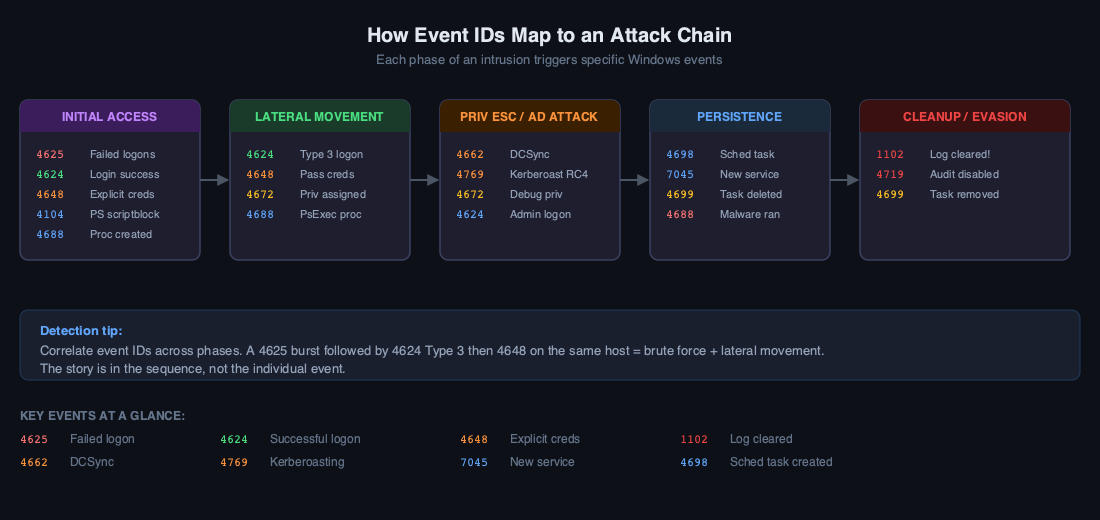
Quick Reference Correlation Table
| Attack Technique | Event IDs to Correlate |
|---|---|
| Brute force → success | Multiple 4625 followed by 4624 |
| Lateral movement (PsExec) | 4648 + 4624 Type 3 on remote host |
| Pass-the-Hash | 4624 Type 3 with NtLmSsP, key length 0 |
| Malware persistence | 4688 then 7045 or 4698 |
| DCSync (Mimikatz) | 4662 with replication GUIDs, non-DC account |
| Kerberoasting | 4769 with EncryptionType 0x17 (RC4) |
| Log tampering | 1102 or 4719 |
| Privilege escalation | 4624 followed by 4672 with debug/backup privileges |
The Events You’re Probably Missing
Most detection programmes are anchored on 4624 and 4625. Those are important, but attackers know they’re watched. The events that describe the actual intrusion — the new service, the scheduled task, the explicit credential use, the share enumeration — often live on channels that aren’t forwarded to the SIEM by default. Check that your log collection includes the System log (for 7045), the Task Scheduler log, and the PowerShell operational log. If you’re only collecting Security events, you have significant blind spots.

Leave a Reply