

There’s a little-known security feature built into Windows that quietly influences whether a file you download can run macros, execute scripts, or open without warnings. It’s called the Mark of the Web — and understanding it is essential for anyone working in security, whether you’re defending systems or investigating incidents.
What Is the Mark of the Web?
The Mark of the Web (MOTW) is a metadata tag that Windows attaches to files downloaded from the internet. It was originally introduced in Internet Explorer as a way to distinguish between local files and files that came from an untrusted source — specifically, the internet.
When Windows marks a file, it adds an Alternate Data Stream (ADS) to the file’s NTFS metadata. You can see it by running:
Get-Item .\document.docx -Stream *You’ll see a stream called Zone.Identifier alongside the default data stream. This is the Mark of the Web.
What’s Inside the Zone.Identifier Stream?
The content is a simple INI-style text:
[ZoneTransfer]
ZoneId=3
ReferrerUrl=https://example.com/
HostUrl=https://example.com/document.docx
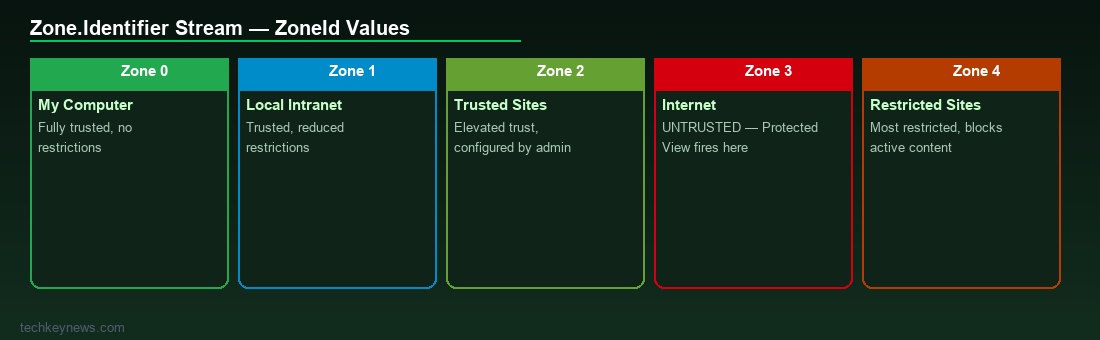
The ZoneId is the key field:
- 0 — My Computer (local, fully trusted)
- 1 — Local Intranet
- 2 — Trusted Sites
- 3 — Internet (untrusted)
- 4 — Restricted Sites
Most downloaded files will have ZoneId=3. Files from your local network may get ZoneId=1 or ZoneId=2 depending on configuration.
Why Does It Matter for Security?
Several Windows security features use MOTW to decide how to treat a file:
Microsoft Office Protected View
When you open a Word, Excel, or PowerPoint file that has ZoneId=3, Office opens it in Protected View — a sandboxed read-only mode where macros and active content are disabled by default. This is one of the most effective defences against malicious macro-laced Office documents.
Windows SmartScreen
SmartScreen checks MOTW-tagged executables against Microsoft’s reputation database before allowing them to run. If you’ve ever seen “Windows protected your PC” when running a downloaded .exe, that’s SmartScreen responding to MOTW.
Defender Application Guard
In enterprise environments, MOTW-tagged files can be routed to Application Guard, which opens them in a Hyper-V isolated container, completely separated from the host.
How Attackers Bypass MOTW
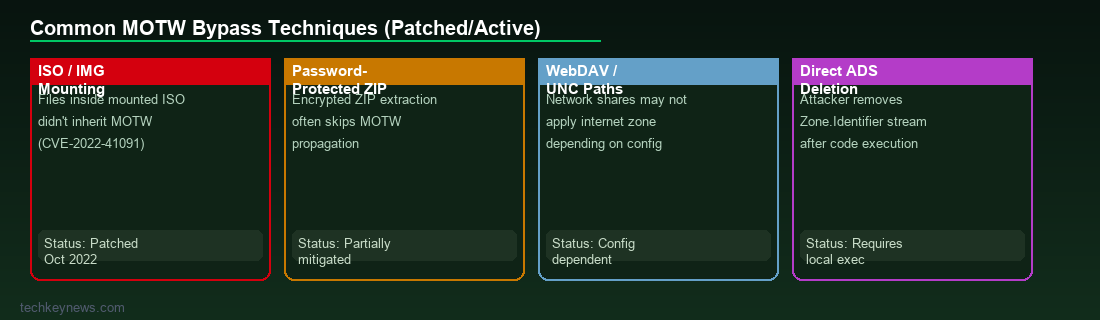
Because MOTW is so effective at triggering security controls, attackers actively work to strip it or avoid triggering it. Common techniques include:
Container File Formats
ISO (.iso), IMG, and VHD/VHDX files are container formats that, when mounted in Windows, create a virtual drive. Until a patch in late 2022 (CVE-2022-41091), files inside a mounted ISO did not inherit the MOTW from the container. Attackers widely abused this — ship an ISO via email or link, the user mounts it, the malicious LNK or executable inside has no MOTW, and security controls don’t fire.
Microsoft patched this, but many older systems remain unpatched.
Password-Protected ZIP Files
When a ZIP is password-protected, Windows cannot inspect its contents during extraction in the same way. Some extraction tools historically didn’t propagate MOTW to extracted files. Attackers distribute malware in password-protected ZIPs specifically to sidestep MOTW propagation.
WebDAV and Network Shares
Files accessed via WebDAV or UNC paths may not always receive MOTW, depending on the zone configuration and how the file is accessed.
Direct NTFS ADS Removal
An attacker with code execution can simply delete the Zone.Identifier stream:
Remove-Item .\malware.exe -Stream Zone.IdentifierDetecting MOTW Abuse in Incident Response
During an investigation, checking for MOTW is a quick way to understand how a file entered the environment:
- Files without MOTW that appear to have come from the internet are suspicious — they may have had MOTW stripped
- The
ReferrerUrlandHostUrlfields in the Zone.Identifier stream can tell you exactly where a file was downloaded from - Look for ISO/IMG files in download directories — they’re a common malware delivery vector specifically because of MOTW bypass history
Checking and Manipulating MOTW (for Lab/Testing)
# Check if a file has MOTW
Get-Content .ile.exe -Stream Zone.Identifier

# Unblock a file (removes MOTW) — the same thing the "Unblock" checkbox in Properties does
Unblock-File .ile.exe

# Add MOTW manually (for testing)
Set-Content .ile.exe -Stream Zone.Identifier -Value "[ZoneTransfer]`nZoneId=3"
Key Takeaway
The Mark of the Web is a simple but powerful security boundary in Windows. When it works, it’s transparent to users and highly effective at limiting the blast radius of malicious downloads. When it’s bypassed — as attackers have increasingly found ways to do — the consequences can be serious. Understanding how it works, where it fails, and how to spot its absence during investigations makes you a sharper defender.

Leave a Reply