

If you’ve been paying attention to the AI tooling space recently, you’ve probably come across the term MCP. It stands for Model Context Protocol, and it’s quickly becoming one of the most talked-about standards in how AI assistants interact with the world around them. Here’s what it actually is and why it matters.
The Problem MCP Solves
Large language models like Claude, GPT-4, and others are powerful at reasoning and generating text — but on their own, they’re locked inside a conversation window. They can’t browse your files, check your calendar, query a database, or call an API unless someone explicitly builds that integration for each model.
The result? Developers end up building one-off integrations for every AI tool they want to connect. The same integration gets built again and again for different models, different apps, and different contexts. It’s inefficient, fragmented, and hard to maintain.
MCP is designed to fix that.
What MCP Actually Is
Model Context Protocol (MCP) is an open standard introduced by Anthropic that defines how AI models communicate with external tools, data sources, and services. Think of it like a USB standard for AI — instead of every device needing its own custom connector, MCP gives everything a common interface.
With MCP, you build a server that exposes tools and resources (say, a file system, a database, or an API), and any MCP-compatible client (like Claude, or an IDE extension, or a custom agent) can connect to it and use those tools without any additional custom integration work.
How It Works: The Architecture
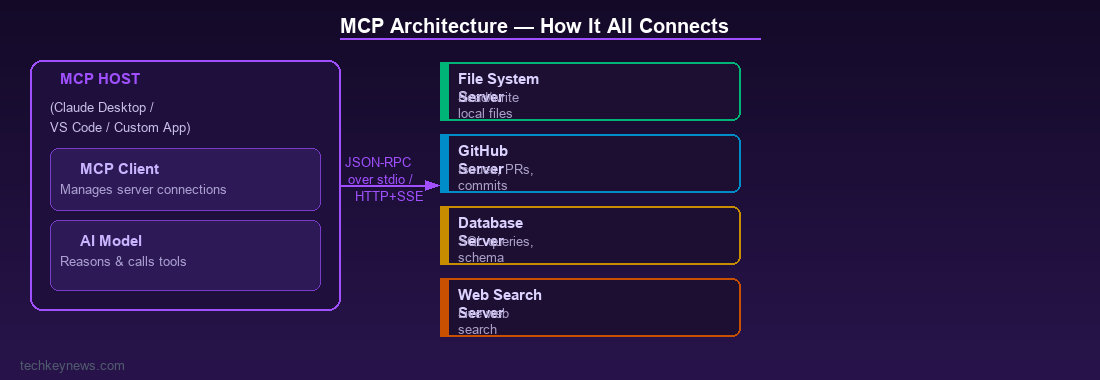
MCP has three main components:
- MCP Host — The application that hosts the AI model (e.g. Claude Desktop, VS Code with an AI extension, a custom chat app)
- MCP Client — Lives inside the host and manages connections to MCP servers
- MCP Server — A lightweight process that exposes specific capabilities (tools, resources, prompts) via the MCP protocol
Communication happens over standard transports — typically stdio (for local servers) or HTTP with Server-Sent Events (for remote servers). The protocol itself uses JSON-RPC 2.0 as its messaging format, which makes it straightforward to implement in any language.
What Can MCP Servers Expose?
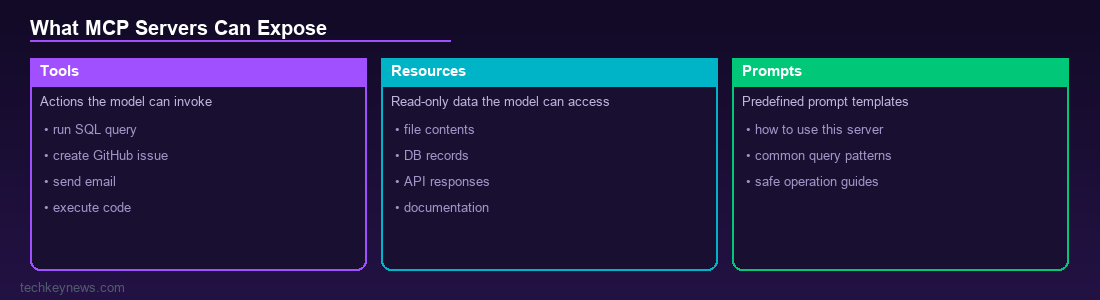
An MCP server can expose three types of things:
- Tools — Actions the model can invoke, like “search the web”, “run a SQL query”, “create a GitHub issue”, or “send an email”
- Resources — Read-only data the model can access, like files, database records, or API responses
- Prompts — Predefined prompt templates that help the model use the server’s capabilities correctly
Real-World Example
Imagine you’re using Claude in your IDE. You want it to read your codebase, check your Jira tickets, and query your internal documentation. Without MCP, each of those requires a separate custom integration. With MCP, each of those systems runs its own MCP server, and Claude connects to all three through a standard protocol. Add a new data source? Just add another MCP server. No changes needed to the model or the host application.
Why It’s Gaining Traction Fast
Several things have made MCP take off quickly:
- It’s open source — the spec and SDKs are publicly available
- Major developer tools are adopting it — including VS Code, Zed, and Cursor
- The community has already built hundreds of MCP servers for common services (GitHub, Slack, Notion, databases, web search, and many more)
- It works with any model that implements the client side, not just Claude
Security Considerations
As with any system that gives AI models access to real tools, there are security implications worth thinking about:
- Tool scope — MCP servers should expose only the tools the model actually needs (principle of least privilege)
- Prompt injection — Malicious content in external data sources could try to hijack model behaviour via injected instructions
- Authentication — Remote MCP servers should require proper authentication, especially if they expose sensitive data or actions
- Audit logging — Track what tools the model calls and with what inputs
Getting Started with MCP
If you want to explore MCP yourself:
- The official spec is at modelcontextprotocol.io
- Anthropic provides SDKs for Python and TypeScript
- Claude Desktop supports local MCP servers out of the box — you configure them in a JSON file and they’re available immediately
- There’s a growing registry of community-built servers covering everything from filesystem access to web scraping to cloud APIs
The Bigger Picture
MCP matters because it’s moving AI from a standalone chat interface to something that can genuinely act as an agent in your existing workflows. When a model can reliably connect to your tools, read your data, and take actions on your behalf through a standardised protocol, the gap between “AI assistant” and “AI that actually helps you get work done” closes significantly.
Whether you’re a developer building AI tools, a security professional thinking about AI risk, or just someone who uses AI daily — MCP is worth understanding. It’s the plumbing that makes agentic AI possible at scale.


Leave a Reply